Where Continuous Access Evaluation Stops Being Continuous
Continuous Access Evaluation is one of the better things to happen to token security in Entra ID. But “near-real-time” turns out to have a coverage map, and Microsoft documents the edges of it

Not every identity attack ends in a stolen token, but increasingly many do. Device-code phishing, adversary-in-the-middle proxies, OAuth consent grants: the front ends look nothing alike, yet they tend to converge on the same prize, a legitimate access or refresh token that Entra issued after a sign-in it had no reason to question. Sometimes that sign-in cleared MFA; sometimes the token was lifted straight off a device that already had. The password was rarely the point. And once an attacker is holding the token, most of your preventive controls have already done whatever they were going to do. What’s left is revocation, and how fast it bites is what decides the incident.
Answering that question is the whole reason Continuous Access Evaluation exists. CAE is the main control you have for containing token theft, which is reason enough to understand it precisely, holes and all.
What CAE is
Continuous Access Evaluation is a near-real-time enforcement mechanism for Conditional Access and token revocation in Entra ID. It’s built on an industry standard, the OpenID Continuous Access Evaluation Profile (CAEP). The core idea is a two-way conversation between the token issuer (Entra) and the relying party, meaning the resource provider that actually serves the request, like Exchange Online.
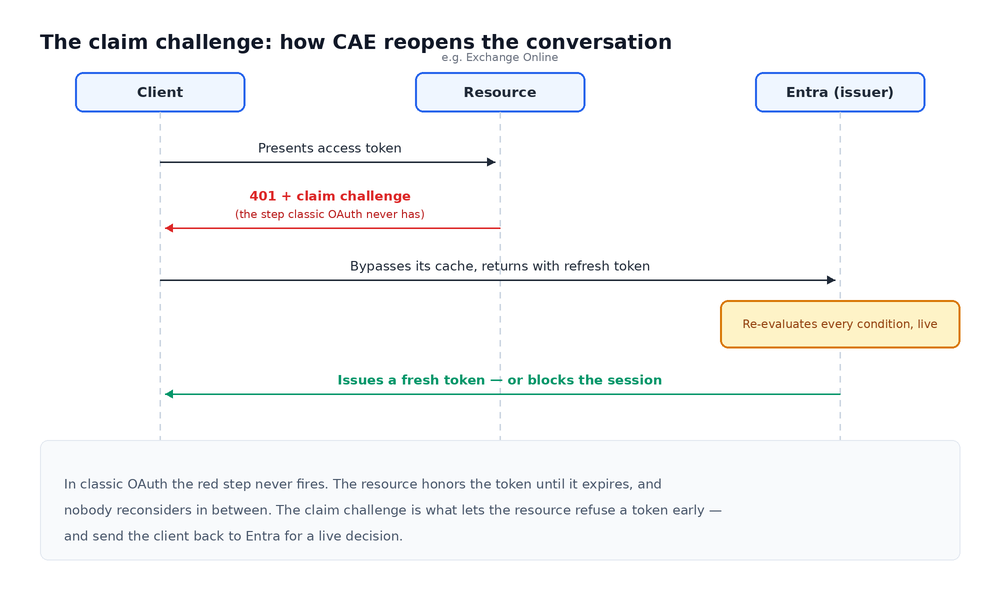
In the classic OAuth model those two parties stop talking the moment a token is issued. Entra mints it, the resource trusts it until it expires, and nobody reconsiders anything in the meantime. CAE opens a channel in both directions. The resource can tell Entra when something changes on its side, such as a request suddenly arriving from a new IP, and Entra can tell the resource to stop honoring a token it has already issued. For incident response, it’s that second direction you care about.
CAE first showed up in preview in 2020 and reached general availability in January 2022; it’s now switched on by default in every Entra tenant. Licensing is layered: the critical-event half travels with any Entra ID license, but the Conditional Access policy half, along with any tuning of CAE’s own settings, requires Entra ID Premium P1, and the high-risk-user signal that can trigger a revocation depends on Identity Protection, which is a P2 feature.
The problem it’s trying to solve
By default, Entra access tokens are valid for about an hour. Conditional Access only gets re-evaluated at refresh, when the client comes back for a new token: whether the account is still enabled, whether the password is still current, whether the user is still inside an allowed location. Between refreshes the resource simply trusts what it already has.
That gap is the problem. Disable a compromised account, reset its password, or revoke its sessions, and the change is real in the directory the instant you make it. A token already sitting in an attacker’s hands, though, can keep working until it expires or the client next refreshes. “Up to an hour” of continued access after you’ve detected and responded is not a rounding error. It can be the difference between containment and a mailbox that keeps exfiltrating while you watch.
Microsoft’s first attempt at this was the blunt one: shorten token lifetimes. That hurt performance and reliability without really closing the risk, since you can always get unlucky inside even a short window. CAE goes after the latency directly instead, making revocation event-driven rather than expiry-driven, and it does so without shredding token lifetime.
How it works
CAE has two halves, and it’s worth keeping them separate, because they cover different things and carry different prerequisites.
The first is critical event evaluation. Enabled resource providers subscribe to a set of high-severity Entra events and act on them within minutes, independent of any Conditional Access policy, which is why this half works in any tenant at all. The triggering events are an account being disabled or deleted, a password change or reset, MFA being enabled for the user, an administrator explicitly revoking all of a user’s refresh tokens, or a high-risk determination from Entra ID Protection. These are the “this user is compromised, cut them off” signals.
The second is Conditional Access policy evaluation. Exchange Online, SharePoint Online, Teams, and Microsoft Graph can sync certain CA policies (most importantly IP-based location) and enforce them inside the service itself, so a session that wanders outside an allowed network gets caught without waiting for the next token refresh.
Underneath both sits the claim challenge. Before CAE, a client just replayed a cached token until it expired. With CAE, the resource can reject a token that hasn’t expired yet by returning a 401 with a claim challenge attached. A CAE-capable client understands that response, bypasses its cache, and goes back to Entra with its refresh token, at which point Entra re-evaluates every condition and decides whether to issue a new token or block. All of this depends on client support, and the support is uneven. Outlook and Teams handle the claim challenge across platforms, Office in the browser does not, and the desktop clients land somewhere in between.
The token lifetime is where this gets counterintuitive. In a CAE-aware session the access token is long-lived, up to 28 hours, rather than the usual one, and the instinct is to read a longer token as a bigger exposure. In practice it works the other way around. The long token is the reward for being on the CAE path, and it’s safe precisely because revocation no longer hangs on expiry: it can be killed mid-stream the moment a critical event fires. Clients that aren’t CAE-capable never get the 28-hour token in the first place. They stay on the default one-hour lifetime and the old refresh-time re-evaluation. A short token you can only kill at refresh is the weaker deal.
One caveat on “near-real-time.” The target for critical events is minutes, but propagation can stretch to about 15 minutes. IP-based location enforcement is the exception; that one is effectively instant.
Where it works well
For the scenarios it covers, CAE is a real improvement, and that’s worth saying plainly.
Disable a user or reset their password and the revocation reaches Exchange, SharePoint, Teams, calendar, and tasks within minutes, rather than at the end of an hour-long token’s life. Revoke a user’s sessions during an incident and, on the covered resources, the kill is near-real-time instead of a hopeful wait. Move outside an allowed IP range mid-session and the location policy is enforced inside the service, not at the next refresh. And because critical event evaluation doesn’t lean on Conditional Access policies at all, those compromise-response signals fire even in tenants that have never built out much of a location-policy estate.
So if your incident is a compromised account being worked through Outlook or Teams against M365, CAE is doing real work for you. The 28-hour token is part of the reason: it keeps sessions stable for everyone else while still letting you cut the compromised one the instant you pull the trigger.
Where it falls apart
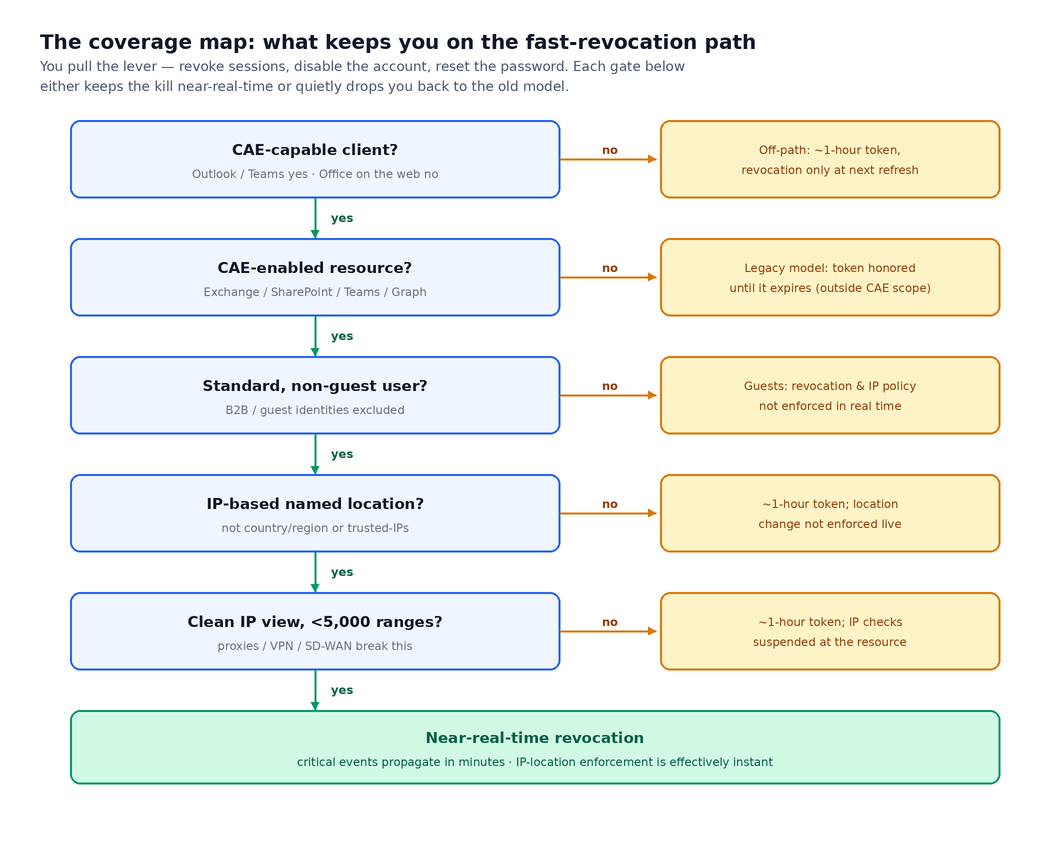
The catch is that “near-real-time revocation” is a property of one specific, narrow path: a CAE-capable client talking to a CAE-enabled resource under the supported conditions. Step off that path and nothing warns you. You quietly fall back to the old model, revocation at the next refresh and roughly an hour of exposure, or to something weaker still. The conditions that knock you off the path are all documented, sitting in the limitations section of Microsoft’s own CAE docs. That section is a coverage map for defenders. It is also, for anyone holding a stolen token, a directory of the places where revocation runs slow.
The documented edges:
Resource scope. The implementation centers on Exchange Online, SharePoint Online, and Teams, with Graph handling policy sync. Anything outside that set gets no near-real-time conversation at all; the legacy token-lifetime model applies in full.
Guest users. CAE doesn’t support guest accounts. Revocation events and IP-based Conditional Access policies are not enforced instantly for them. A compromised B2B identity is a blind spot by design, and most tenants carry more guests, and watch them less closely, than they assume.
Policy and group-membership changes. Changes to CA policies or group membership can take up to a day to reach the resource providers. Microsoft has optimized that toward two hours in some cases, but not all of them. If your containment plan depends on a policy change taking effect, it isn’t really a containment control. Only an explicit session revocation forces immediate effect.
Location condition type. CAE can only see IP-based named locations. It has no visibility into country/region conditions or the MFA trusted-IPs feature. Build your location policy on those rather than on IP ranges and CAE won’t enforce the change in real time; Entra drops back to a one-hour token.
IP-variation and large location sets. When Entra sees an allowed egress IP but the resource sees a disallowed one, which happens routinely with proxies, VPN split-tunneling, and SD-WAN, Entra issues a one-hour token that suspends IP checks at the resource. The same fallback kicks in when the IP ranges across your location policies exceed 5,000 entries. Microsoft’s own guidance is blunt about the workaround here: stuffing nonenumerable egress IPs into trusted locations to dodge this actively weakens your posture.
Office on the web and WAM-disabled channels. Office web apps don’t support the claim challenge, so they drop to a one-hour token whenever a CA policy is set. Office configured to disable Web Account Manager on the Semi-Annual channel isn’t CAE-supported at all.
Co-authoring and push previews. Inside a live co-authoring session, access may not actually be revoked until the document or app is closed, or the hour mark arrives. And push-notification message previews aren’t protected by IP policy.
CAE is sold, fairly, as near-real-time revocation. But the guarantee holds only on the covered path, and the gaps line up uncomfortably well with what a stolen token would want: an identity type it ignores, a resource it can’t reach, a location model it can’t read. None of those are exotic — proxies and guests are the normal state of a real tenant.
A word on magnitude, since it’s easy to overstate this. This is not “tokens live forever.” On the covered resources the exposure is bounded, roughly the one-hour token window, or up to a day for a policy or group change to take hold. The genuinely open-ended case is resources sitting entirely outside CAE’s scope, where the old model just applies unchanged. So the thing to hold onto is where revocation runs slow, not how to never get revoked — accurate, and still uncomfortable enough to plan around.
What this means when you’re responding
The practical takeaway is broader than CAE itself. Blocking an attack path and killing an attacker’s tokens are different actions, and only one of them is containment. A Conditional Access rule that blocks a flow, device code for instance, stops new issuance through that flow and does nothing about tokens already in circulation. The lever that actually cuts an active session is revocation: revoke the user’s refresh tokens, reset the password. CAE is what makes that lever fast, on the covered path.
So when you pull it during a token-theft incident, don’t assume it landed everywhere at once. Ask where the stolen token is actually being used. If it’s Outlook or Teams against M365, CAE is on your side and the kill is quick. If it’s a guest identity, a non-Microsoft resource, or a tenant leaning on country/region locations, you’re back on hour-long latency, and you should plan the response around that gap instead of against the marketing. And for the device-registration and Primary Refresh Token escalations the higher-end token-theft kits chase, revoking the user’s sessions is necessary but not sufficient; check what devices and tokens got minted along the way before you call it contained.
Continuous Access Evaluation closes the revocation gap that token theft has always exploited. It just closes it on a map, and the first thing worth doing is reading the edges.
References
Continuous access evaluation in Microsoft Entra — Microsoft Learn: https://learn.microsoft.com/en-us/entra/identity/conditional-access/concept-continuous-access-evaluation
Block authentication flows with Conditional Access policy — Microsoft Learn: https://learn.microsoft.com/en-us/entra/identity/conditional-access/policy-block-authentication-flows
Authentication flows as a condition in Conditional Access — Microsoft Learn: https://learn.microsoft.com/en-us/entra/identity/conditional-access/concept-authentication-flows
Revoke a user’s sign-in sessions (Revoke-MgUserSignInSession) — Microsoft Learn: https://learn.microsoft.com/en-us/powershell/module/microsoft.graph.users.actions/revoke-mgusersigninsession